WordPress powers over 43% of the entire web — and attackers know it. In 2025 alone, over 11,000 new vulnerabilities were disclosed across WordPress plugins and themes. The question for every site owner isn’t whether to use a security plugin, but which one.
We’ve done a deep technical comparison of the five most important WordPress security plugins: Wordfence, Sucuri, MalCare, Solid Security, and our own product, UltraGuard Pro. We’re transparent that we make UltraGuard Pro, and we’ve tried to be genuinely honest about where each plugin is stronger. We’ll call out our own weaknesses.
TL;DR — Quick Verdict
How We Compared These Plugins
We evaluated each plugin across six categories that actually matter for site owners in 2025:
- WAF quality — Does it stop SQLi, XSS, RFI, path traversal, and zero-day exploit attempts?
- Malware detection and removal — What percentage does it catch? Can it clean automatically?
- Login and access protection — 2FA, passkeys, brute-force limits, session management
- Performance impact — Server resource usage and page load effect
- Compliance and reporting — GDPR, PCI-DSS evidence generation
- Value for money — Especially for agencies managing multiple sites
Wordfence
Wordfence is the 800-pound gorilla of WordPress security. Its free version is genuinely the most generous in the market — malware scanner, endpoint WAF, login protection including 2FA, and live traffic monitoring are all included at zero cost. For site owners with no budget, this is still the default recommendation.
Its biggest strength is threat intelligence. Wordfence operates a bug bounty programme (Wordfence Intelligence) that pays independent security researchers to discover and disclose WordPress vulnerabilities. They also aggregate attack data from millions of WordPress sites. No other security plugin has anything close to this dataset.
The endpoint WAF is architecturally superior to cloud-based alternatives in one important way: it cannot be bypassed by attackers who discover your server’s direct IP address. Cloud-based WAFs like Sucuri’s can be circumvented if an attacker skips DNS and talks directly to your server. Wordfence cannot be bypassed this way.
Where Wordfence falls short
The malware scanner is resource-intensive. Deep scans cause noticeable CPU and memory spikes — a genuine problem on shared hosting. The scanner also does not reliably detect database-injected malware or infections in premium themes and plugins outside the WordPress.org repository.
Alert fatigue is a documented problem. The firewall generates frequent notifications for routine blocked attacks, making it easy to miss genuinely serious threats buried in the noise.
Most critically for agencies: there is no multi-site or agency pricing plan. Wordfence requires a separate licence key for every site. At $149/year per site, protecting 20 client sites costs approximately $1,790/year with any volume discounts applied. This is the single biggest reason agencies look for alternatives.
Strengths
- Most generous free tier in the market
- World-class threat intelligence database
- Endpoint WAF cannot be IP-bypassed
- Free 2FA and login protection
- Live traffic monitoring
- Huge community and documentation
Weaknesses
- No agency or multi-site pricing
- Free tier firewall is 30 days behind on rules
- High CPU/memory usage during scans
- Misses database-injected malware
- Alert fatigue from high notification volume
- No compliance report generation
- No passkey (WebAuthn) support
Sucuri
Sucuri’s fundamental architecture is different from every other plugin on this list. Its WAF is cloud-based — your traffic is routed through Sucuri’s network before reaching your server. This means malicious requests never touch your hosting infrastructure at all, which eliminates the resource usage problem that plagues Wordfence. The cloud CDN also improves performance, often making sites faster with Sucuri active.
The inclusion of unlimited manual malware removal on all paid plans is a meaningful differentiator. When your site gets infected, Sucuri’s security analysts clean it for you at no additional charge. This is worth a premium for business site owners who don’t want to handle incidents themselves.
The bypass problem
The cloud WAF architecture has one significant vulnerability: if an attacker discovers your server’s direct IP address, they can bypass Sucuri entirely by connecting directly rather than through Sucuri’s DNS. This is a known attack technique. Wordfence’s endpoint architecture doesn’t have this weakness. Sucuri recommends locking your server to only accept traffic from their IP ranges, but this requires server-level configuration that many WordPress users can’t do.
The scanner problem
Multiple independent tests have found that Sucuri’s malware scanner misses database-injected malware — one of the most common attack vectors used in WordPress compromises. The free plugin’s scanner is surface-level. The premium scanner is better, but it still relies on you knowing there’s a problem and then triggering cleanup. The unlimited removal service compensates for this, but you have to know you’ve been hacked first.
Setup complexity is another documented friction point. DNS-level firewall configuration requires more technical knowledge than most WordPress users have, and requires TTL propagation time that leaves gaps in protection during migration.
Strengths
- Cloud WAF with zero server resource usage
- CDN improves site performance
- Unlimited professional malware removal (all paid plans)
- Excellent DDoS protection
- Works even if your site goes offline
Weaknesses
- Cloud WAF can be bypassed via direct IP
- Scanner misses database-injected malware
- Complex DNS setup required
- Most expensive option at $199+/year
- Free plugin is very limited
- No native 2FA for site users
- No compliance report generation
MalCare
MalCare’s selling proposition is simple: cloud-based scanning means zero performance impact, and one-click auto-removal means you don’t need to understand malware to get rid of it. For busy site owners who want protection without management overhead, this is genuinely compelling.
The cloud scanner works by syncing your site files to MalCare’s servers, where deep inspection runs without touching your hosting CPU. This solves Wordfence’s biggest pain point on shared hosting. The one-click removal feature automatically cleans infections without requiring manual file editing or expert knowledge.
Where MalCare is weaker: the firewall is less sophisticated than Wordfence’s, and the free version is quite limited — no malware removal and no comprehensive database scanning. The tool is focused on one job (malware detection and removal) and does that job very well, but it’s not a full security suite.
Strengths
- Cloud scanning with zero server impact
- One-click automated malware removal
- Good agency pricing (~$599 for 20 sites)
- Strong focus on malware detection accuracy
Weaknesses
- Free version lacks core features
- Firewall less comprehensive than Wordfence
- No passkeys or advanced authentication
- No file integrity monitoring
- No compliance reports
- No WooCommerce-specific protection
Solid Security (formerly iThemes Security)
Solid Security (rebranded from iThemes Security in 2023) takes a different philosophy from the others: rather than trying to detect and clean malware after infection, it focuses on hardening WordPress to prevent infection in the first place. Its integration with Patchstack’s vulnerability database gives it virtual patching — automatically deploying firewall rules to block exploitation of newly discovered plugin vulnerabilities before a developer even releases a fix.
At $99/year it’s the most affordable premium option, and the user interface is the most approachable of any plugin on this list. Non-technical site owners can achieve solid protection in under 30 minutes.
The passkeys implementation is genuinely ahead of the market — Face ID, Touch ID, and Windows Hello login work natively, making password-free login practical for the first time on WordPress.
Where Solid Security is limited
It doesn’t have a true WAF in the traditional sense — the “firewall” is primarily .htaccess-based rules rather than deep packet inspection. Malware scanning is outsourced to the Sucuri SiteCheck API, which checks your URL from an external server — the same scanner that misses database malware. There is no built-in malware removal. For sites facing active attacks or persistent infections, Solid Security needs to be paired with another tool.
Strengths
- Most affordable premium option ($99/year)
- Easiest setup — beginner-friendly interface
- Patchstack virtual patching integration
- Passkeys (WebAuthn) support
- Lightest server resource usage
Weaknesses
- No true WAF (htaccess rules only)
- Malware scanner outsourced to Sucuri API
- No malware removal capability
- No database scanner
- No compliance reporting
- No WooCommerce-specific security
UltraGuard Pro
We’ll be direct: as the developer of UltraGuard Pro, this section is written by us about ourselves. Take that with appropriate scepticism. What we’ll try to do here is explain what we built, why we built it differently, and where we’re genuinely weaker than established competitors.
UltraGuard Pro is built as a full-stack WordPress security suite — one plugin covering every layer of WordPress security rather than excelling at one or two things. The reason for that scope was simple: every other plugin on this list requires a site owner to identify and fill its gaps with additional plugins. We wanted a plugin where that wasn’t necessary.
What’s genuinely different
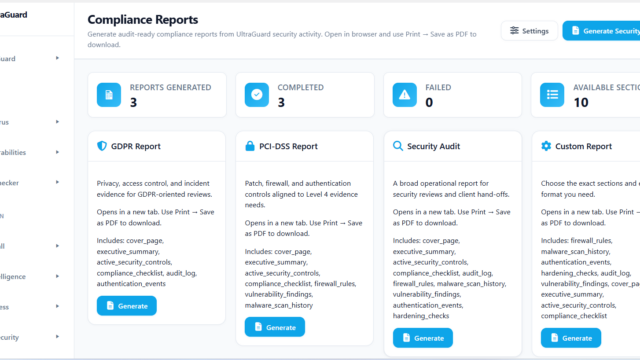
Built-in GDPR and PCI-DSS compliance reports. No other security plugin generates downloadable compliance evidence reports from your own security data. As GDPR enforcement tightens and the EU Cyber Resilience Act takes effect, the ability to show an auditor a documented record of your security measures has real business value. Every competitor requires you to assemble this documentation manually from disparate sources.
WooCommerce Security Mode with JavaScript skimmer detection. Magecart-style skimmer attacks — where malicious JavaScript is injected into checkout pages to steal payment card data — are one of the fastest-growing attack types against WordPress eCommerce. UltraGuard Pro includes real-time JavaScript anomaly detection specifically designed to catch these attacks. No other plugin in this comparison has a dedicated WooCommerce security mode.
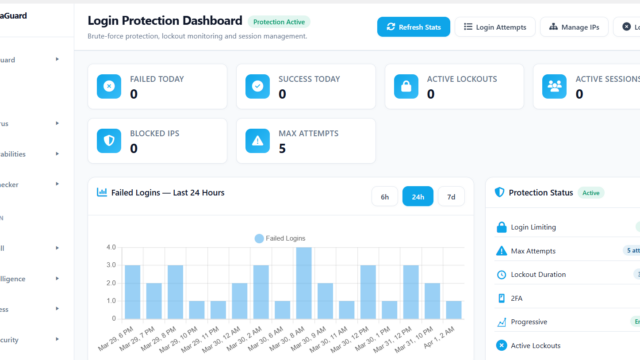
WAF with 8 detection layers running at init priority 2. The firewall includes IP whitelist/blacklist, CIDR range support, rate limiting, geo-blocking, bot detection, proxy/VPN detection, full OWASP attack pattern matching (SQLi, XSS, RFI, RCE, path traversal, XXE, SSRF, CMDi, LFI), and user-defined custom rules. Cloud threat intelligence feeds integrate directly with the firewall.
Agency pricing that makes sense. $399/year covers 20 sites — $20 per site. The only reason this seems unusual is that every other plugin in this space charges per-site. We think that’s wrong for how agencies actually work.
Strengths
- Only plugin with built-in GDPR/PCI compliance reports
- WooCommerce security mode with skimmer detection
- Full 8-layer WAF with OWASP pattern matching
- Passkeys (WebAuthn) and TOTP 2FA
- File integrity monitoring and change detection
- Vulnerability scanner with virtual patching
- Database scanner for injected payloads
- Best agency pricing: $399 for 20 sites
- Real-time SSE dashboard (no polling)
- Modular architecture — enable only what you need
Weaknesses
- New — smaller install base and community
- No one-click automated malware removal
- No managed cleanup service (unlike Sucuri)
- Threat intelligence database not yet as large as Wordfence
- Fewer third-party reviews to compare
Full Feature Matrix
| Feature | Wordfence | Sucuri | MalCare | Solid Security | UltraGuard Pro |
|---|---|---|---|---|---|
| WAF (Web Application Firewall) | ✓ Endpoint | ✓ Cloud | ◑ Basic | ◑ .htaccess | ✓ 8-layer endpoint |
| Malware Scanner | ✓ File-based | ◑ Misses DB | ✓ Cloud | ◑ External API | ✓ 10-layer |
| Database Scanner | ✗ | ✗ | ◑ Premium | ✗ | ✓ Pro |
| Auto Malware Removal | ✗ Manual only | ✓ Managed | ✓ One-click | ✗ | ◑ Quarantine + guided |
| Login Brute-Force Protection | ✓ Free | ✓ | ✓ | ✓ | ✓ Free |
| Two-Factor Auth (TOTP) | ✓ Free | ✗ | ✗ | ✓ Pro | ✓ Pro |
| Passkeys (WebAuthn) | ✗ | ✗ | ✗ | ✓ Pro | ✓ Pro |
| File Integrity Monitoring | ✓ | ✓ | ✗ | ✗ | ✓ Pro |
| Vulnerability Scanner | ✓ | ◑ Basic | ✓ | ✓ Patchstack | ✓ Pro |
| Virtual Patching | ◑ Premium | ✗ | ✗ | ✓ Patchstack | ✓ Pro |
| Geo-Blocking | ✓ Premium | ✓ | ✓ | ✗ | ✓ Free |
| Rate Limiting | ✓ | ✓ | ◑ | ◑ | ✓ Free |
| WooCommerce Security Mode | ✗ | ✗ | ✗ | ✗ | ✓ Pro — unique |
| JS Skimmer Detection | ✗ | ✗ | ✗ | ✗ | ✓ Pro — unique |
| Audit Log | ◑ Premium | ✓ | ✗ | ✗ | ✓ Free |
| Uptime & SSL Monitoring | ✗ | ✗ | ✗ | ✗ | ✓ Pro |
| Auto Plugin/Theme Updater | ✗ | ✗ | ✗ | ✗ | ✓ Free |
| GDPR/PCI Compliance Reports | ✗ | ✗ | ✗ | ✗ | ✓ Pro — unique |
| Real-Time Traffic Monitor (SSE) | ✓ | ✗ | ✗ | ✗ | ✓ Free |
| Performance Impact | Medium–High | None (CDN+) | Very Low | Low | Low |
| Multisite Support | ✓ | ✓ | ✓ | ✓ | ✓ Free |
✓ = Full support ◑ = Partial/limited ✗ = Not available “Pro” or “Premium” = paid tier only
Pricing Comparison
Single-site pricing is fairly uniform across the market, with Solid Security at the affordable end and Sucuri at the premium end. The real pricing divergence happens at scale — specifically for agencies managing multiple sites.
| Sites | Wordfence | Sucuri | MalCare | Solid Security | UltraGuard Pro |
|---|---|---|---|---|---|
| 1 site | $149 | $199 | $149 | $99 | $149 |
| 5 sites | ~$640 | ~$800+ | ~$349 | ~$249 | $149 (still 1 licence) |
| 10 sites | ~$1,200 | ~$1,500+ | ~$499 | ~$399 | $399 (agency plan) |
| 20 sites | ~$1,790 | ~$2,800+ | ~$599 | ~$499+ | $399 |
| Cost per site (20) | ~$90 | ~$140 | ~$30 | ~$25 | $20 |
Best WordPress Security Plugin for Agencies
If you manage more than five WordPress sites for clients, the per-site pricing model that most security plugins use becomes a significant operational cost. Wordfence doesn’t offer agency pricing at all — their WordPress.org support forum has multiple threads from agencies asking for a multi-site plan and being told to email presales. There’s no published agency tier.
MalCare has the best agency pricing among established players, with a 20-site plan at approximately $599/year. UltraGuard Pro’s agency plan at $399/year for 20 sites is the lowest cost-per-site of any plugin on this list at $20/site — and covers more features (compliance reports, WooCommerce security, file integrity monitoring) than MalCare’s equivalent tier.
For agencies, the compliance reporting module is also practically valuable: generating a GDPR or PCI-DSS evidence report for a client is a billable deliverable that previously required manual documentation. Having it automated and downloadable directly from the dashboard changes the economics of security audits.
Best WordPress Security Plugin for WooCommerce
WooCommerce stores face a specific threat that general-purpose security plugins aren’t designed for: JavaScript payment skimmers. Magecart-style attacks inject malicious JavaScript into checkout pages to silently capture credit card data as customers type it. These attacks often persist for months undetected because standard malware scanners look for server-side code, not client-side script injection.
UltraGuard Pro is the only plugin on this list with a dedicated WooCommerce Security Mode that includes real-time JavaScript anomaly detection. For store owners processing payments, this is a meaningful security layer that no other plugin provides at this price point. PCI-DSS compliance reporting is also directly relevant to WooCommerce store owners — payment processors increasingly require documented evidence of security measures.
For WooCommerce sites with managed hosting that don’t need the WAF (because Cloudflare handles it), Solid Security at $99/year provides good baseline hardening and is the most affordable option. For stores that have experienced attacks or hold high-value customer data, UltraGuard Pro’s full stack — WAF, skimmer detection, compliance reports, and vulnerability patching — covers the complete threat surface.
Final Verdict — Which Plugin Should You Use?
No single plugin is right for every site. The honest answer is that your choice should be driven by your specific threat model, your technical confidence, and your budget — not brand recognition alone. We’ve tried to give you the information to make that decision without overselling our own product.
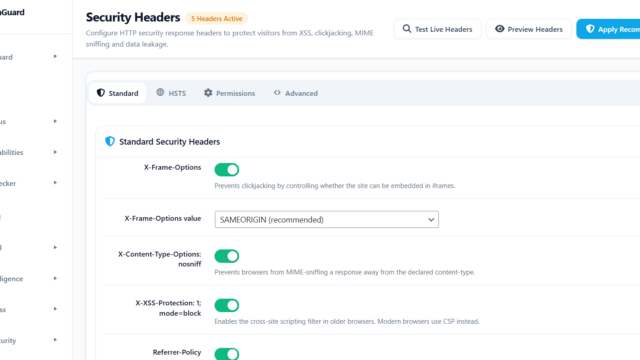
If you’re evaluating UltraGuard Pro, the free tier is available on WordPress.org (slug: ultraguard-security-suite) and covers WAF, malware scanner, login limiter, security headers, WordPress hardening, audit log, and real-time traffic monitoring with no time limit.