When someone visits your WordPress site, their browser and your server have a conversation. Your server sends back the page the visitor requested — along with a set of instructions telling the browser how to handle it.
Most of these instructions are invisible. Visitors never see them. Developers rarely think about them. But they matter enormously for security.
These instructions are called HTTP response headers — and by default, WordPress sends almost none of the security-related ones.
That means your visitors’ browsers have no guidance about whether your site should be embedded in an external iframe (it should not be), whether scripts can run from untrusted sources (they should not be able to), how much of your URL to share with other sites when a visitor clicks a link (usually less than the default), or whether the camera and microphone should be accessible to embedded content on your pages (they should not be).
Without security headers, browsers make liberal assumptions. With them, you lock down exactly what is and is not allowed — removing attack surface that attackers actively exploit.
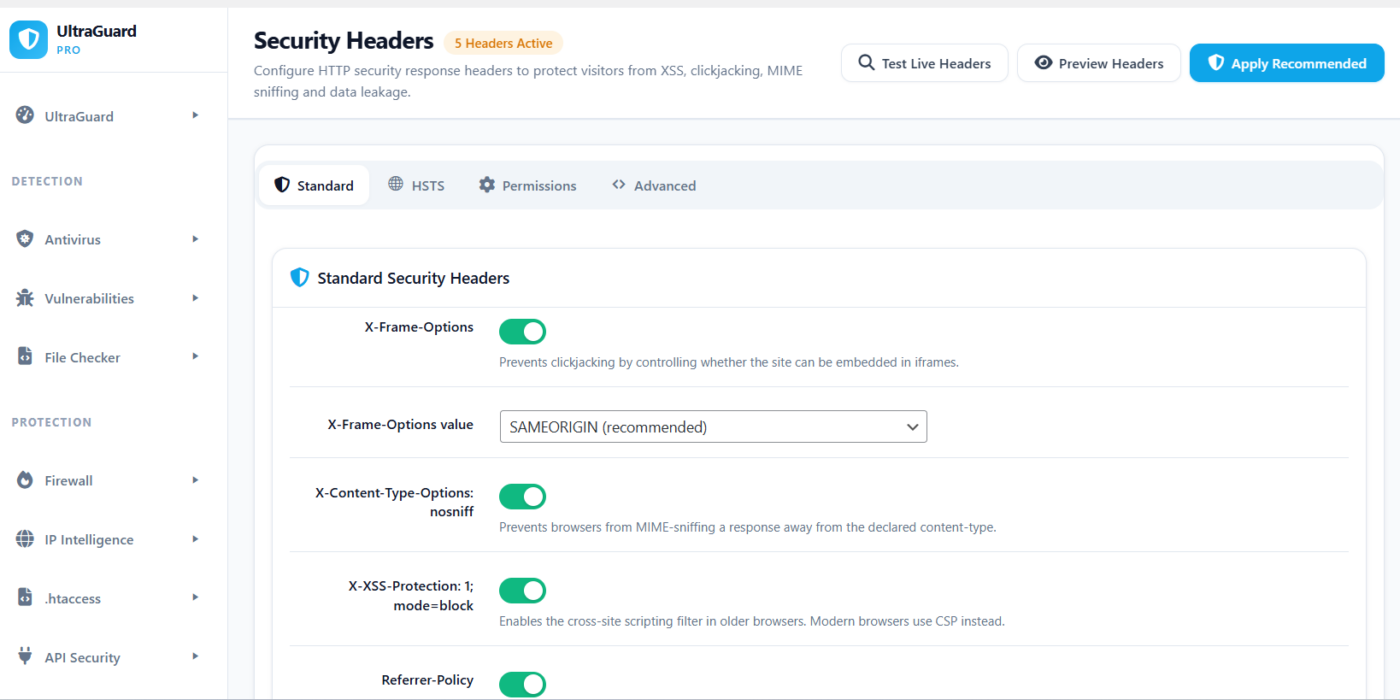
UltraGuard’s Security Headers module gives you full control over every major security header through a simple settings panel with live preview and live testing. No server configuration required. No editing .htaccess or nginx.conf. Just toggle, configure, and save.
It is entirely free.
Why Headers Matter — The Simple Version
Think of HTTP response headers as the instructions on a medicine bottle. The medicine is your web page content. The instructions tell whoever receives it how to use it safely.
Without the instructions, the recipient makes their own judgements — and sometimes those judgements are wrong. A browser that does not know whether to allow iframes might allow one that is being used to clickjack your visitors. A browser that does not know what content sources are legitimate might run a script injected by a cross-site scripting attack.
Security headers are those instructions. They do not change the content of your site — they change how browsers are allowed to handle it. And because browsers from every major vendor respect these headers, enabling them immediately improves the security posture of every visitor to your site.
The Nine Security Headers UltraGuard Controls
UltraGuard organises its security headers into four groups across four settings tabs: Standard, HSTS, Permissions, and Advanced.
Standard Headers (Tab 1)
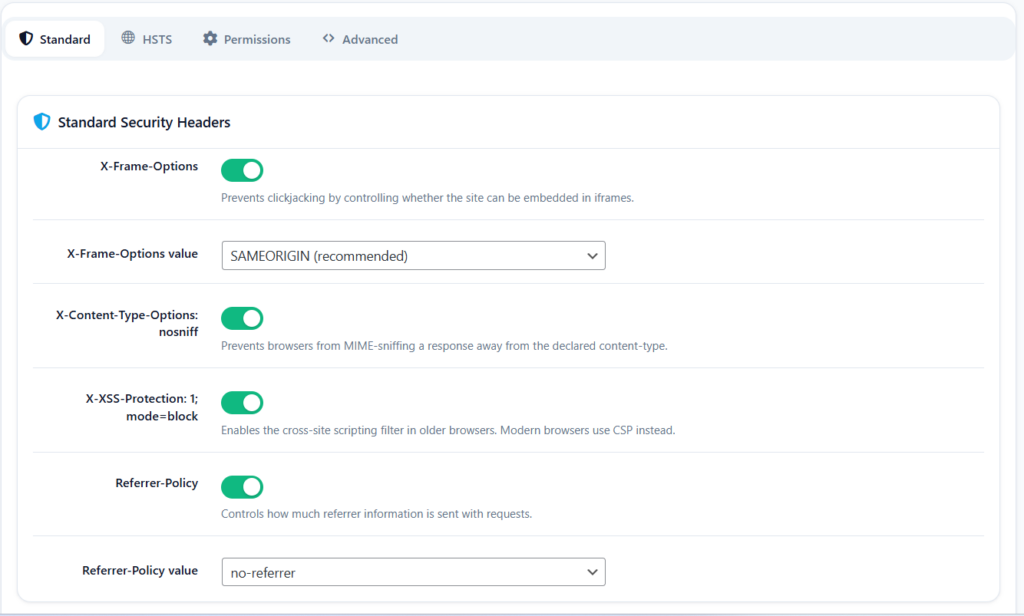
These four headers address the most common browser-level attacks and are the first ones you should enable on any WordPress site.
1. X-Frame-Options — Stop Clickjacking
What it does: Tells browsers whether your site is allowed to be displayed inside an <iframe> on another domain.
What it prevents: Clickjacking — a technique where an attacker embeds your site in a transparent iframe overlaid on top of their own malicious page. The visitor thinks they are interacting with the attacker’s page, but their clicks are actually landing on your site’s buttons, forms, or links beneath the transparent layer.
A classic clickjacking attack works like this: an attacker creates a page that says “Click here to claim your prize”. Behind it, in a transparent iframe positioned precisely, is your site’s “Delete Account” button or “Confirm Payment” button. The visitor clicks what they think is the prize button — and clicks your button instead.
The two options:
SAMEORIGIN(recommended) — your site can only be framed by pages on your own domain. Gutenberg editor, theme customizer, and other legitimate admin frames still work.DENY— your site cannot be framed by anyone, including your own domain. More restrictive, but may break some admin functionality.
Default: Enabled, set to SAMEORIGIN.
2. X-Content-Type-Options: nosniff — Stop MIME Sniffing
What it does: Sends the header X-Content-Type-Options: nosniff on every response.
What it prevents: MIME-sniffing attacks. Browsers have a feature where they try to detect what type of content a file is, even if the server says it is something different. For example, if your server says a file is text/plain but the file’s contents look like HTML, some browsers will run it as HTML anyway.
Attackers exploit this: they upload a file to your site (perhaps disguised as an image) that actually contains JavaScript. The browser’s MIME-sniffer detects the JS content and runs it as a script, even though the server declared it as an image. The nosniff header tells browsers to strictly honour the declared content type and never guess — eliminating this entire attack class.
Options: No configuration needed — the value is always nosniff.
Default: Enabled.
3. X-XSS-Protection: 1; mode=block — Legacy XSS Filter
What it does: Sends X-XSS-Protection: 1; mode=block, enabling the built-in XSS filter present in older browsers (Internet Explorer, older Chrome).
What it prevents: Reflected cross-site scripting in browsers that have a native XSS filter. When the browser detects that a script in the page response matches content in the request (a sign of reflected XSS), it blocks the page from loading entirely.
Important note: Modern browsers (current Chrome, Firefox, Safari) have deprecated this header in favour of Content Security Policy. But many users still run older browsers, and sending this header costs nothing while providing protection for those users.
Default: Enabled.
4. Referrer-Policy — Control What You Share With Other Sites
What it does: Controls how much of your page’s URL is shared as the Referer header when a visitor navigates from your site to another.
What it prevents: URL-based information leakage. Imagine a visitor is on a private page of your site — /account/orders/order-12345 — and clicks a link to an external site. Without a Referrer-Policy, that external site’s server receives the full URL of your private page in the Referer header, including the order ID. The same happens with user IDs in URLs, session tokens in query strings, and any other sensitive URL parameters.
The eight options, from most to least restrictive:
no-referrer— never send any referrer information at allno-referrer-when-downgrade— send full URL on HTTPS→HTTPS, nothing on HTTPS→HTTPorigin— send only the domain (e.g.yoursite.com), never the path or query stringorigin-when-cross-origin— send full URL to same origin, only domain to other originssame-origin— send full URL to same origin, nothing to other originsstrict-origin— send only domain on same-security-level requests, nothing on downgradesstrict-origin-when-cross-origin(recommended) — send full URL within your own site, just the domain to other HTTPS sites, nothing to HTTP sitesunsafe-url— always send the full URL everywhere (never recommended)
Default: Enabled, set to strict-origin-when-cross-origin — the current W3C recommendation and the default behaviour Google Chrome adopted in 2020.
HSTS (Tab 2) — Force HTTPS Forever
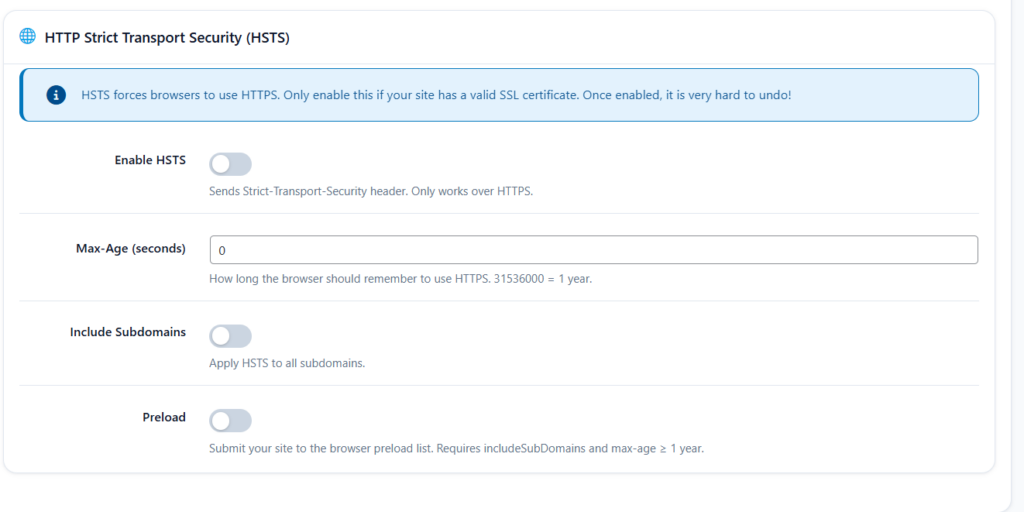
Header: Strict-Transport-Security
What it does: Tells browsers that your site should only ever be accessed via HTTPS — and to remember this for a specified period. Once a browser has seen this header, it will automatically convert any HTTP request to your site into HTTPS, even before the server responds.
What it prevents: Protocol downgrade attacks and SSL-stripping. Even when a site has HTTPS, a visitor might type yoursite.com in their browser (without the https://) and initially connect over HTTP before being redirected to HTTPS. During that brief HTTP connection — even a fraction of a second — an attacker who can intercept the traffic (on a shared network, for example) can strip the HTTPS redirect and keep the connection on HTTP. HSTS prevents this by making the browser skip HTTP entirely.
The three configuration options:
Max-Age (default: 31536000 seconds = 1 year) — how long the browser should remember to enforce HTTPS. The minimum effective value is 300 seconds (5 minutes). The HSTS preload list requires at least 31,536,000 seconds (one year).
Include Subdomains (default: on) — applies the HSTS policy to all subdomains as well. If you have shop.yoursite.com, mail.yoursite.com, etc., enabling this ensures they are all HTTPS-enforced. Only enable this if every subdomain has a valid SSL certificate.
Preload (default: off) — submits your site to the browser vendors’ HSTS preload lists. Preloaded sites are hardcoded into browsers to always use HTTPS — even on a fresh browser that has never visited your site before. Requires includeSubDomains enabled and a max-age of at least one year. This is the most powerful protection but also the hardest to undo if your SSL certificate lapses.
⚠️ Important: Only enable HSTS if your site has a valid, installed SSL certificate on HTTPS. Enabling HSTS on a site without SSL will make it completely inaccessible until you fix the certificate.
Default: Disabled by default. UltraGuard warns you before enabling it.
Permissions Policy (Tab 3) — Control Browser Features
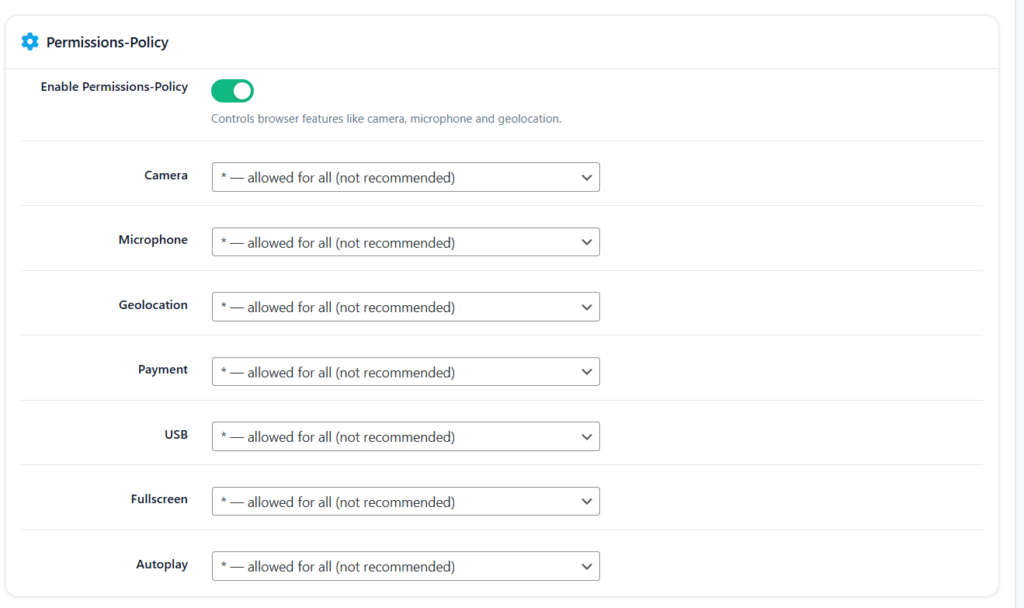
Header: Permissions-Policy
What it does: Tells browsers which powerful browser features — camera, microphone, geolocation, and others — are allowed to be used on your pages, and by whom.
What it prevents: Malicious scripts or third-party embedded content accessing sensitive device capabilities without your knowledge. If a script injected via XSS or a compromised third-party widget tries to access a visitor’s camera or microphone, the Permissions-Policy header can block it outright.
UltraGuard gives you individual control over seven browser features, each with three permission levels:
()— blocked for all (recommended for most features): no origin — not your site, not iframes, not scripts — is allowed to use this feature(self)— current site only: your own pages can use the feature, but embedded third-party content cannot*— allowed for all: anyone can use the feature (not recommended)
The seven features you control:
| Feature | Default | What It Controls |
|---|---|---|
| Camera | () blocked | Access to the device camera |
| Microphone | () blocked | Access to the device microphone |
| Geolocation | () blocked | Access to the visitor’s physical location |
| Payment | (self) site only | Access to the Payment Request API |
| USB | () blocked | Access to USB devices |
| Fullscreen | (self) site only | Ability to enter fullscreen mode |
| Autoplay | (self) site only | Ability to autoplay media |
Example: If your site embeds a third-party chat widget and that widget’s code is compromised, a camera=() policy prevents the malicious code from ever accessing the visitor’s camera — even if it asks for permission.
Default: Enabled, with sensible conservative defaults for each feature.
Advanced Headers (Tab 4)
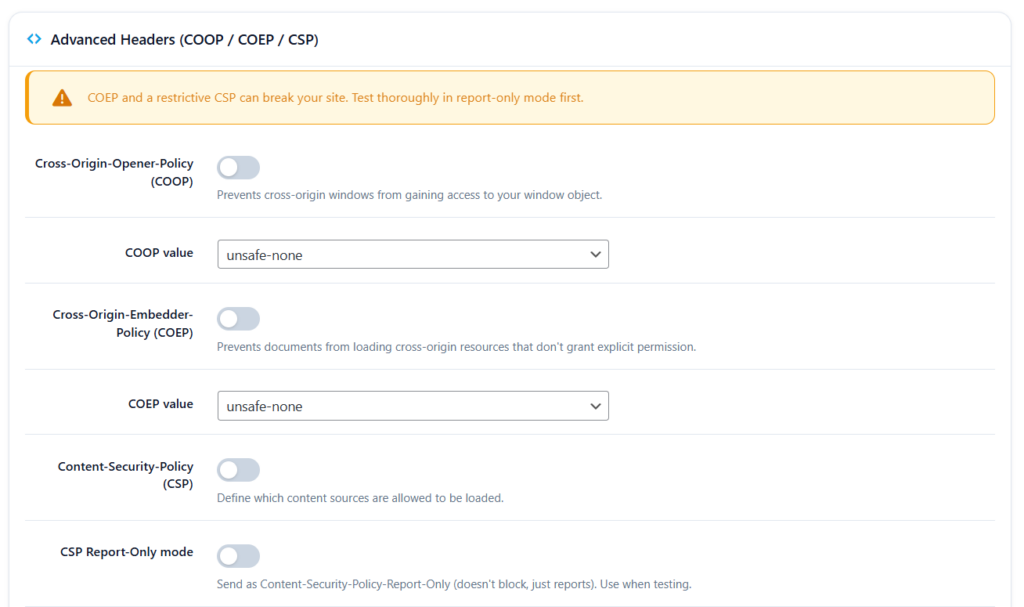
These three headers are more powerful but carry more risk if misconfigured. UltraGuard provides warnings and guidance before you enable them.
Cross-Origin-Opener-Policy (COOP)
What it does: Controls whether your page shares a browsing context group with cross-origin pages opened via links or popups.
What it prevents: Cross-origin window attacks — specifically the Spectre vulnerability class. When a page opens a cross-origin popup or is opened as a popup itself, the two pages may share a process — meaning they could potentially access each other’s memory. COOP prevents this sharing.
The three options:
unsafe-none— default browser behaviour, no isolationsame-origin-allow-popups— isolated from other origins, but popups opened by your page can still interactsame-origin(strictest) — full isolation from all cross-origin windows
Default: Disabled. Only recommended for sites that need to enable high-performance features like SharedArrayBuffer and cross-origin isolation (typically SaaS applications, not WordPress sites).
Cross-Origin-Embedder-Policy (COEP)
What it does: Prevents your document from loading cross-origin resources that do not explicitly grant permission via CORS or CORP headers.
What it prevents: Loading third-party resources that have not explicitly consented to being embedded — closing a class of data-leakage attacks.
The three options:
unsafe-none— default behaviour, no restrictionsrequire-corp— requires all cross-origin resources to send a Cross-Origin-Resource-Policy header explicitly allowing embeddingcredentialless— loads cross-origin resources without cookies or credentials, less strict thanrequire-corp
⚠️ COEP with
require-corpwill break any third-party resources (images, fonts, scripts, iframes) that do not explicitly opt in. Test in staging before enabling on production.
Default: Disabled.
Content Security Policy (CSP)
What it does: The most powerful security header available. CSP is a whitelist that tells browsers exactly which sources are allowed to load scripts, styles, images, fonts, and other resources on your pages. Anything not on the whitelist is blocked.
What it prevents: Cross-site scripting, data injection, and malicious resource loading. A properly configured CSP is the strongest defence against XSS attacks — even if an attacker successfully injects a <script> tag into your page, the browser will refuse to run it if the source is not in your CSP whitelist.
The default CSP value UltraGuard suggests:
default-src 'self';
script-src 'self' 'unsafe-inline';
style-src 'self' 'unsafe-inline';
img-src 'self' data: https:;
font-src 'self' data:;
Report-Only mode (default: on when CSP is enabled) — instead of blocking policy violations, the browser reports them (to the browser console or a reporting endpoint) without enforcing them. This is the right way to test a CSP before enabling enforcement — you can see what would be blocked without actually breaking your site.
⚠️ CSP is powerful but complex. A badly written CSP can block your own JavaScript, your theme’s stylesheets, or your payment gateway’s checkout scripts. Always start in Report-Only mode and review what the browser reports before switching to enforcement.
Default: Disabled. Requires configuration specific to your site’s content and third-party resources.
The Live Test and Preview Features
Two buttons at the top of the Security Headers page make configuration much safer and easier.
Preview Headers
Clicking Preview Headers shows you exactly which headers will be sent based on your current settings — with the exact header name and value — before you save or before any visitor sees them. This is a dry-run view: “if I saved now, these are the headers your site would send.”
Test Live Headers
Clicking Test Live Headers makes a real HTTP request from your server to your own site’s homepage and reads back the actual headers being sent. It then compares them against the seven expected security headers and gives you:
- A pass/fail status for each header
- The actual value being sent (or “not sent” if missing)
- An overall score out of 100 and a letter grade (A–F)
This verifies that the headers are genuinely being sent — not just that they are configured in UltraGuard’s settings. It catches situations where another plugin or your hosting provider might be overriding headers, or where a caching layer is stripping them.
The scoring works as follows: 7 expected headers, equal weight. Each header present earns its share of the score. 90+ = Grade A, 75–89 = Grade B, 60–74 = Grade C, 40–59 = Grade D, below 40 = Grade F.
Apply Recommended
The Apply Recommended button resets all headers to their recommended defaults in one click — enabling the five standard headers (X-Frame-Options, X-Content-Type-Options, X-XSS-Protection, Referrer-Policy, Permissions-Policy) and leaving HSTS, CSP, COOP, and COEP disabled until you are ready to configure them properly.
Headers Are Applied Everywhere
UltraGuard sends security headers on every single response from your WordPress site:
- All frontend pages — homepage, posts, pages, products, archives, search results
- All admin pages — wp-admin dashboard, plugin pages, theme settings
- REST API responses — the headers are injected into every API response via WordPress’s
rest_post_dispatchfilter
This means the protection is consistent across every entry point into your site, not just public-facing pages.
What the Defaults Give You Immediately
Out of the box, with UltraGuard’s default settings, five security headers are enabled immediately on installation:
X-Frame-Options: SAMEORIGIN
X-Content-Type-Options: nosniff
X-XSS-Protection: 1; mode=block
Referrer-Policy: strict-origin-when-cross-origin
Permissions-Policy: camera=(), microphone=(), geolocation=(), payment=(self), usb=(), fullscreen=(self), autoplay=(self)
These five headers together prevent clickjacking, MIME-sniffing, legacy XSS, referrer-based data leakage, and unauthorised access to device capabilities — all without any configuration required, from the moment you install UltraGuard.
All Settings at a Glance
Standard Tab
| Header | Setting | Default |
|---|---|---|
| X-Frame-Options | Enable + choose SAMEORIGIN or DENY | On / SAMEORIGIN |
| X-Content-Type-Options | Enable (value is always nosniff) | On |
| X-XSS-Protection | Enable (value is always 1; mode=block) | On |
| Referrer-Policy | Enable + choose policy value | On / strict-origin-when-cross-origin |
HSTS Tab
| Setting | What It Does | Default |
|---|---|---|
| Enable HSTS | Send Strict-Transport-Security header | Off |
| Max-Age | Browser memory duration in seconds | 31536000 (1 year) |
| Include Subdomains | Apply to all subdomains | On |
| Preload | Submit to browser preload lists | Off |
Permissions Tab
| Feature | Default |
|---|---|
| Camera | () blocked |
| Microphone | () blocked |
| Geolocation | () blocked |
| Payment | (self) site only |
| USB | () blocked |
| Fullscreen | (self) site only |
| Autoplay | (self) site only |
Advanced Tab
| Header | Setting | Default |
|---|---|---|
| COOP | Enable + choose value | Off |
| COEP | Enable + choose value | Off |
| CSP | Enable + write directives | Off |
| CSP Report-Only | Test mode (reports, doesn’t block) | On (when CSP enabled) |
Security Headers Is Free
The entire Security Headers module is part of UltraGuard’s free tier. All nine headers, all configuration options, live preview, live testing, Apply Recommended — everything described in this article is available at no cost.
Download UltraGuard Free → View All Features →
Summary
| Header | Attack It Prevents | Default |
|---|---|---|
| X-Frame-Options | Clickjacking via malicious iframes | On |
| X-Content-Type-Options | MIME-sniffing attacks | On |
| X-XSS-Protection | Reflected XSS in legacy browsers | On |
| Referrer-Policy | URL-based information leakage | On |
| Permissions-Policy | Unauthorised camera/mic/geo access | On |
| Strict-Transport-Security | Protocol downgrade and SSL-stripping | Off (configure first) |
| Content-Security-Policy | XSS and malicious resource injection | Off (configure first) |
| Cross-Origin-Opener-Policy | Cross-origin window memory attacks | Off (advanced) |
| Cross-Origin-Embedder-Policy | Unauthorised cross-origin resource loading | Off (advanced) |
Five headers active immediately on install. Four more when you are ready to go deeper.
All free. No server config required.
UltraGuard Security Headers is part of the free core of UltraGuard Security Suite v6.7.2. Requires WordPress 5.6+ and PHP 8.1+.