Your WordPress site is being probed right now.
Not metaphorically. Not occasionally. Right now — automated bots are scanning your login page, testing known plugin vulnerabilities, and looking for any crack in your defences. Most site owners only find out they’ve been compromised when Google blacklists their domain, their host suspends their account, or a customer calls to say their credit card details were stolen.
The security plugin market promises to fix this. But after paying for a WAF plugin here, a malware scanner there, a two-factor plugin somewhere else — you’re running five tools that barely talk to each other, spending $300–$500 a year, and still not sure you’re actually protected.
We built UltraGuard to change that. One plugin. 27 tightly integrated security modules. A free tier that already outperforms most paid solutions on the market.
Here’s exactly what’s inside — pulled straight from the code.
The Problem With WordPress Security Today
WordPress powers over 40% of the web, which makes it the single most targeted platform on the internet. The attack surface is enormous: the core installation, themes, plugins, login endpoints, REST API, XML-RPC, database — each one a potential entry point.
The typical site owner’s response is to bolt on a collection of single-purpose plugins. A brute-force blocker. A file scanner. A header hardener. Each plugin runs independently, logs independently, and has no awareness of what the others are doing. An attacker who gets blocked by one module can simply pivot to an attack vector that another module doesn’t cover.
UltraGuard was architected differently from the ground up. Every module shares a common core — the same database layer, the same cache manager, the same notification system, the same audit trail. When the firewall blocks an IP, that block is immediately visible to the login limiter, the traffic monitor, and the audit log. When the vulnerability scanner detects an unpatched CVE, the WAF can apply a virtual patch instantly without waiting for the plugin author to release a fix.
That’s the difference between a security suite and a collection of plugins.
What You Get Free — The 11 Free Feature Modules
UltraGuard’s free tier is not a crippled demo. It is a complete, production-grade security stack that outperforms many plugins that charge $100+ per year. Here’s what’s included.
1. Firewall (WAF)
The firewall is the first line of defence — and it’s real. Not a basic IP blocklist, but an 8-layer Web Application Firewall that intercepts requests before WordPress even loads.
The eight layers cover:
- OWASP attack pattern matching — SQL injection, cross-site scripting, remote file inclusion, remote code execution, and local file inclusion patterns, all matched against a continuously maintained signature library
- IP and CIDR controls — whitelist and blacklist individual addresses or entire network ranges
- Sliding-window rate limiting — detect and throttle abnormally high request volumes without blocking legitimate traffic spikes
- Geo-blocking — block entire countries or allow only specific regions, powered by a full country-code mapping
- Bot and bad user-agent detection — identify and block known malicious crawlers, scrapers, and attack tools
- VPN, proxy, and datacenter detection — stop automated traffic that hides behind anonymising infrastructure
- Auto-ban on attack threshold — automatically escalate temporary rate limits to permanent bans when an IP crosses a configurable attack count
- Reputation feed integration — connect to hostile IP feeds for crowd-sourced threat intelligence
Every blocked request is logged, timestamped, and visible in the Live Traffic Monitor in real time.
2. Antivirus — 10-Layer Malware Scanner
Most security plugins scan file names or run a simple hash check. UltraGuard’s antivirus engine runs ten independent detection passes on every scannable file across your installation.
The ten layers, in order of execution:
- MD5 hash matching — instant comparison against a database of known malware signatures (fastest layer, catches the most common threats)
- PHP heuristics — detection of critical execution patterns: web shells piping user input directly to
passthru,shell_exec,system, andeval; classic base64 execution chains likeeval(base64_decode(...)),eval(gzinflate(base64_decode(...))), and multi-layer variants; remote file inclusion viaincludeandrequireon HTTP URLs - Obfuscation detection — suspicious patterns that warrant human review: variable-variable chains, long
chr()concatenation sequences,str_replaceobfuscation, and known backdoor signatures including c99, r57, WSO, AlfaShell, and b374k - Polymorphic pattern detection — obfuscation techniques that mutate to evade signature matching, detected through structural analysis rather than fixed patterns
- Supply-chain dropper detection — self-modifying code and cURL-based backdoors that download and install secondary payloads
- JavaScript threat detection — crypto miners (CoinHive, CryptoNight, Monero stratum patterns), credit card skimmers detecting exfiltration of CVV and card number fields, keyloggers, obfuscated eval chains, and script injection patterns
- HTML injection — hidden zero-dimension iframes, external iframe injections pointing to non-trusted domains, and malicious script tag injections
- WordPress core integrity — every core file is verified against official checksums from
api.wordpress.org; any modification to a core file is flagged immediately - High-entropy string analysis — detection of encoded payloads through statistical analysis of character distribution, catching obfuscated malware that evades pattern matching
- Vulnerability detection — cross-reference installed plugins and themes against a local vulnerability database, with optional WPVulnDB API integration
Files that fail any layer are quarantined automatically. One-click remediation options are presented in the dashboard.
3. Login Limiter
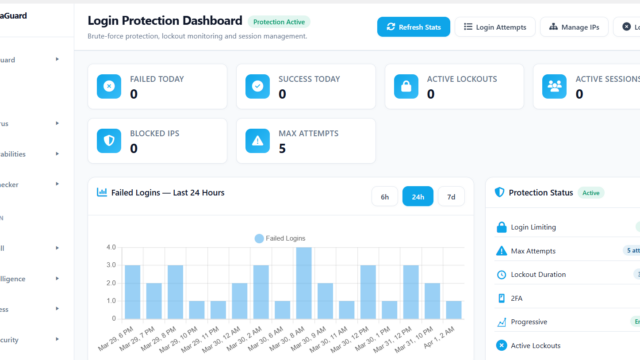
Brute-force attacks against wp-login.php are the single most common attack vector against WordPress. The Login Limiter stops them with configurable thresholds, temporary and permanent IP bans, session management, and real-time lockout notifications.
4. Login URL Obfuscation
Replaces the default /wp-login.php path with a secret URL of your choosing. Every attempt to hit the original login URL is logged, the source IP is flagged, and you can configure an automatic ban after a set number of hits. Bots probing for your login page find nothing.
5. WordPress Hardening
One-click hardening applies a suite of best-practice security changes without requiring manual file edits: disabling XML-RPC, removing WordPress version exposure from HTML source and HTTP headers, protecting sensitive files from direct access, and more.
6. Security Headers
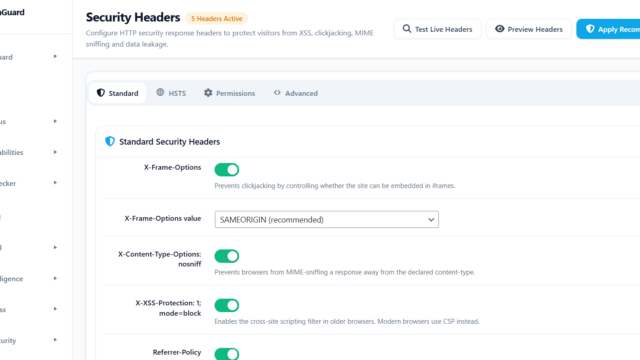
Sends the full suite of HTTP security headers on every response: Content Security Policy, HTTP Strict Transport Security, X-Frame-Options, X-Content-Type-Options, Referrer-Policy, and Permissions-Policy. A live preview shows exactly what each header value will do before you save.
7. Live Traffic Monitor
A real-time request feed delivered via Server-Sent Events — no polling, no page refreshes. Every request to your site appears in the monitor with threat classification labels (SQLi, XSS, brute force, rate limit), geo hints, user-agent details, and a one-click block button. You can watch attacks happen and stop them in real time.
8. Audit Log
A full, tamper-evident activity trail covering every login, failed authentication attempt, settings change, plugin activation, and security event. Searchable, filterable by event type, and fully exportable for compliance purposes.
9. Auto Plugin & Theme Updater
Automated WordPress core, plugin, and theme updates with configurable scheduling, per-item exclude lists, and rollback hooks. Never miss a security patch because you forgot to log in.
10. .htaccess Manager
A visual editor for Apache .htaccess rules, backed by a template library of pre-built security configurations. Preview changes before applying them, and roll back safely without leaving wp-admin.
11. Notifications
Configurable security alert delivery via email, webhook, and Slack. Each event type — login failure, malware detection, IP ban, file change — has its own delivery toggle so you get the alerts you want without the noise you don’t.
UltraGuard Pro — Advanced Protection for Sites That Can’t Afford Downtime
The free tier covers the essentials. Pro unlocks ten additional feature modules for sites that need enterprise-level protection: WooCommerce stores processing real payments, agencies managing client portfolios, and any site where downtime or a breach carries serious commercial consequences.
Authenticator — Passkeys & 2FA
WebAuthn passkey authentication and TOTP two-factor, with per-role enforcement, grace periods, backup codes, and self-enrollment flows. Passkeys are phishing-resistant by design — there is no password to steal.
Vulnerability Scanner
Detects known CVEs in every installed plugin, theme, and WordPress core version using the WPScan and Patchstack vulnerability databases. The critical differentiator: when a vulnerability is detected in a plugin that hasn’t yet been patched, UltraGuard can apply a virtual WAF patch instantly — blocking the known exploit vector at the firewall level without waiting for the plugin author.
Database Scanner
Scans every table in your WordPress database for injected malicious content: SEO spam links, pharma hack content, eval() injections hidden in post content, hidden iframes, and backdoor admin accounts created without your knowledge.
File Checker — File Integrity Monitor
Tracks every file in your WordPress installation and raises an instant alert when any tracked file is created, modified, or deleted outside of an authorised update. Catches the moment a backdoor is installed.
IP Reputation & Threat Intelligence
Cloud-synced hostile IP feeds integrated directly with the WAF. Automatically blocks visitors whose IPs appear in shared threat intelligence databases — no configuration required.
WooCommerce Security Mode
Checkout-specific protections for WooCommerce stores: JavaScript skimmer detection watching for credential and card data exfiltration, checkout rule enforcement, and WooCommerce-aware security event logging that understands the difference between a shopper and an attacker.
Blacklist & Reputation Monitor
Continuous monitoring of your domain and server IP addresses against major blacklist providers. Instant alert the moment your site appears on a blacklist, before search engines and browsers start warning your visitors.
Uptime & SSL Monitor
Site availability monitoring with response time tracking and SSL certificate health checks. Alerts when your site goes down and when your certificate is approaching expiry — before your visitors see a browser warning.
Compliance Reports
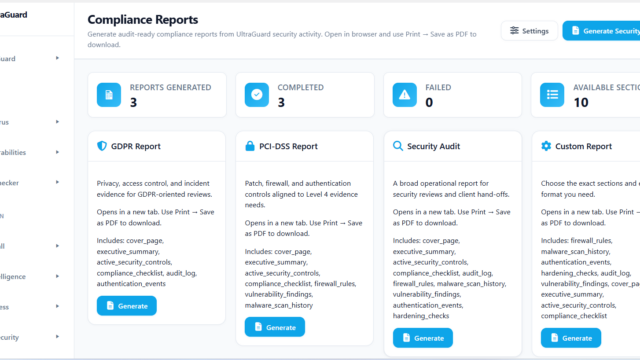
Downloadable evidence reports for GDPR, PCI-DSS, ISO 27001, and SOC 2 audits, generated automatically from UltraGuard’s security data. What used to take days of manual evidence collection now takes minutes.
REST API & XML-RPC Security
Route-level access controls, API key enforcement, and per-endpoint rate limiting for the WordPress REST API. Combined with the hardening module’s XML-RPC controls, this closes off two of the most commonly abused attack surfaces in modern WordPress installations.
Built for Developers
UltraGuard v6.7.2 is written in PHP 8.1+ with a clean, modern architecture that developers will recognise and respect.
The entire plugin uses a PSR-4 autoloader with full namespace separation — no procedural globals, no function name collisions with other plugins. Every module receives the dependency injection container via its constructor, making the system safely extensible without touching core files. Real-time data delivery uses Server-Sent Events rather than polling, keeping the admin dashboard responsive without hammering your server. The database layer uses granular key-based cache invalidation to prevent redundant reads under load.
Native WordPress Multisite support is included in the free tier. The plugin is GPL v2 licensed and ships with dozens of action and filter hooks — including ultraguard_pro_init — for developers who need to extend or integrate with the security suite.
Pricing
UltraGuard uses a straightforward freemium model with no artificial feature restrictions on the free tier.
Free — 11 feature modules including the full WAF, antivirus scanner, login protection, live traffic monitor, security headers, and more. No credit card required. No time limit. Download from ultraguard.net/download and be protected in under two minutes.
Pro — $149/year (1 site) — All 27 modules unlocked, including vulnerability scanning with virtual patching, passkey authentication, database scanner, file integrity monitor, WooCommerce security, compliance reports, and IP threat intelligence.
Agency — $399/year (up to 20 sites) — Everything in Pro, across your full client portfolio. Deploy across 20 managed sites and manage them all from one licence.
Getting Started
Installing UltraGuard takes under two minutes:
- Download the plugin ZIP from ultraguard.net/download
- Upload via Plugins → Add New → Upload Plugin in your WordPress admin
- Activate the plugin — the onboarding wizard launches automatically
- Select your modules, apply recommended settings, and let the wizard seed baseline scan data
The WAF is live, the scanner is running, and login protection is active before you finish your coffee.
The Bottom Line
WordPress sites are attacked every day. The question is not whether your site will be targeted — it’s whether you’ll be protected when it is.
UltraGuard gives you a real WAF, a 10-layer malware scanner, live traffic visibility, and a full hardening toolkit — free, with no trial period and no feature gating. When your site grows to the point where it needs vulnerability scanning, passkey authentication, or compliance reporting, Pro is there.
One plugin. 27 modules. No compromise.